Release Notes
What has changed across the JoinXR app — Quest, Pico, iPad and the Windows Desktop App — and the JoinXR web platform, including CAD Optimiser.
November 2026
Section titled “November 2026”App 2.1.12442.0
New Features
- Speaker notes. Add your notes in the desktop editor and view on headset. Accessed via the Slide Navigation panel.
Improvements
On Headset
- Hand Gestures
- Near interaction grabbing now works against detailed collision models
- Both near and far interaction triggerable using a single, much more robust detection
- Near grabbing no longer has ‘scale by distance from body’ behaviour
- Dictation now supports multiple languages (English + your user’s set language)
- “Document” button now gives you a tool tip if it’s disabled saying why
- Hand menus torn off or world menus can be either tag along or pinned to the to world. Use pin button on menu title bar
- Videos can now be played by tapping directly on them
- PDFs can have thier pages turned by tapping on either side of the page
Desktop Editor
- Added blue and grid axis lines to editor grid
- Multi select delete now possible
- Objects can now be disabled/hidden on slides
- Objects can now have their name set in a document
- Default object name no longer prefixed with type i.e “Model (mymodelname.glb)” since we have the type icons
Fixes
- Fixed anchor being messed up when resuming a kiosk mode meeting from a sleeping device when the device is in VR mode
- Fixed near interaction triggering the image buttons twice
- Fixed toggling of editor grid in preferences being inconsistent
- “Save as” now maintains the source docs “Allow Device Caching” flag
- Fix for JXR part scale and rotation being wrong when resetting or snapping if the transform was mirrored or non-uniform
October 2026
Section titled “October 2026”App 2.0.12245, 2.0.12273 · Web 20261028.1
JXR Improvements
Section titled “JXR Improvements”- Full PBR Material Texture Support
- Base Colour
- Roughness Metallic
- Ambient Occlusion
- Emissive
- Normal Map
- Limitations
- Single UV set per material
- Reduced memory usage by at least 50%. Meaning improved load speed and allows more models loaded in a single document
- Animation support
- Limitations
- No Skinned mesh
- No Blendshapes
- Uniform scale animation only
- Limitations
- Unlit material support
- Double sided material support - off by default. Enabled from the object properties. Only use this when needed as it can slow rendering performance
- Parts now support non-uniform transforms and mirroring.
- Lighting and transparency now more in line with GLB models
- Overall performance improvements
Other Improvements
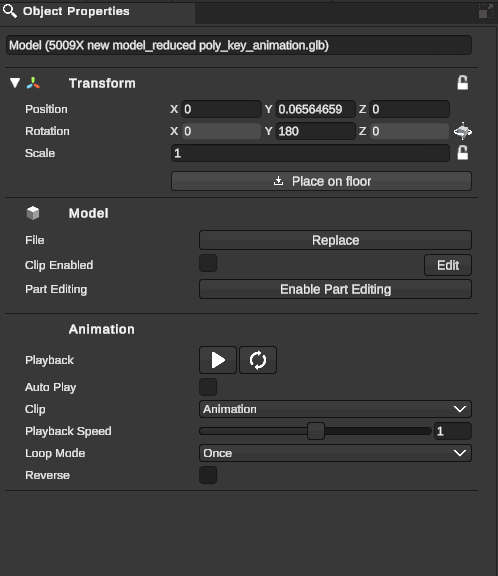
Section titled “Other Improvements”- New animations controls
- Clip seleciton
- Playback speed
- Ping pong
- Reverse
- Import slides from other documents. Documents -> Import Slides
- Images, Notes, Videos and PDFs can now be free rotating. Just toggle Y axis lock from the object properties
- Improved objects properties layout. Lock, lock scale, y axis lock and place on floor now shown in the transform section
Bug fixes
Section titled “Bug fixes”- Fix for bug that stopped part manipulation from working with GLB under certain circumstances
- Stopped performance warning symbol being always on in editor
- General performance indicator (color in bottom right) now includes JXR stats
- Editor grid now remains visible no matter how small the grid size is
- Center gizmo mode now correctly center on root objects
- CAD Optimiser
- Animations using STEP keyframes now supported
- Better handling of unlit materials
- FBX material import improvements
- Stopped occasional double button taps when using hands and far interaction on Quest
September 2026
Section titled “September 2026”App 1.38.12011 · Web 20260910.2, 20260923.1
- A new immersive environment. With this release, we say farewell to our original dark background and welcome a simpler, brighter environment that feels more like the real world
- Meeting Admin menu is now accessible on iOS.
- FBX and OBJ files are now converted to GLB before upload in the editor, giving faster loading and much more reliable material reproduction on FBX files.
- Undo and Redo buttons and menu items.
- Scrolling now increases movement speed in FreeLook/WASD mode.
- New editor shortcut:
Homeresets the camera view to the origin. - CAD Optimiser Experimental Section:
- Remove small objects
- Smart Collapse Lead Nodes
- Orient faces
- Download recordings as MP4
Improvements
Section titled “Improvements”- Improved performance when entering part editing.
- The stats window now matches the colours and recommended values used in CAD Optimiser.
- Optional updates now prompt you when a new version is available for better visibility
- Skinned meshes now use a static mesh collider instead of having no collision at all.
- Added a Microsoft Store download link to the downloads page.
- Updated the pairing instructions in onboarding to show iPad instead of Magic Leap 2.
- Duplicating a slide now keeps the original name and appends “Copy”.
- CAD Optimiser
- JXR is now listed first among output formats, with descriptive text on when to use each option.
- Statistics bars now use solid colours instead of gradients, for improved clarity.
- VRay material support for FBX files
- Switching to an alternative importer in CAD Optimiser no longer requires re-uploading your file.
- Alternative importer options in CAD Optimiser are now only shown when supported by the file format, and the list has been streamlined.
- Improved retry logic
- Fixed hierarchical hiding and unhiding of model parts, restoring part isolation.
- Fixed small animation movements being lost when the parent was scaled to zero.
- Fixed the text cursor not always being visible in input fields.
- Fixed recording playback breaking intermittently.
- Fixed the Change Password page.
- Fixed FBX files with certain cyclic node hierarchies (for example those created by VRay) failing to import.
- Fixed model pivots being reset during CAD Optimiser conversion.
Security
Section titled “Security”- Various security hardening improvements across the web platform.
Known issues
Section titled “Known issues”- Very large JXR models (over roughly 8.3 million vertices) may not register collisions, which can prevent grabbing or interacting with them directly. We’re continuing to work on a fix.
August 2026
Section titled “August 2026”App 1.37.11731 · Web 20260731.1, 20260814.1, 20260817.1
- Kiosk Mode now supports iPad and Windows. iPad and Windows devices can be added to a kiosk group alongside headsets. These devices receive audio from everyone in the session, so mute the microphone and speakers, or use headphones.
Improvements
Section titled “Improvements”- A warning now appears during base placement if your floor height looks incorrect.
- In Kiosk Mode you are now told when you appear to be joining from a different location, rather than the app searching for the anchor indefinitely.
- Pico headsets can now join meetings with every other platform. Previously, Pico devices could only meet other Pico devices.
- CAD Optimiser conversions that fail because of capacity are now automatically retried.
- No Clip now works if you turn it on before enabling the clipping plane.
- Clipped JXR models no longer show stray geometry between slides.
- The clipping plane now behaves correctly when moved with the centre gizmo.
- 2 fixes for Pascal based GPUs
Security
Section titled “Security”- Continued security hardening across the web platform.
July 2026
Section titled “July 2026”App 1.37.11562 · 1.37.11569, 1.37.11665Web 20260629.1, 20260703.1, 20260723.3
- CAD Optimiser has a redesigned interface, with a clearer layout, better polygon and draw-call feedback bars, and guidance when a model is over the recommended limits.
- Snap to floor. Objects now snap to the nearest horizontal surface when you drag them within 25cm of it — turn it on in Preferences on device. The desktop editor gains a matching Place on floor button in the inspector.
Improvements
Section titled “Improvements”- Improved texture compression quality, and normal maps are now compressed.
- Models are no longer rotated 180° when imported, so they arrive facing the right way.
- The hierarchy now expands automatically when you enter part edit mode.
- Middle-click panning in the desktop editor is smoother and more predictable.
- New editor shortcuts:
Ctrl+Sto save andHto hide a part. - Adding content in the desktop editor no longer auto-fits the view.
- New editor icons and assorted interface tidy-ups.
- The installer no longer launches two copies of the app.
- Duplicating a slide during a multi-user session no longer resets part transforms.
- Scrolling over the slide contents panel no longer scrolls the scene view behind it.
- Fixed a visible lag between opaque and transparent JXR geometry when moving a model.
- Fixed the spatial anchor staying active in VR mode, which prevented teleporting.
- Fixed renaming devices from the My Organisation page.
- Fixed model orientation handling when adding GLB models through the Desktop App.
June 2026
Section titled “June 2026”App 1.36.11305 · Web 20260604.1, 20260616.1
Update required — Everyone needs to be on this version or later to share a meeting.
- Part manipulation. Individual parts of both JXR and standard models can now be moved on their own, with a new interface for setting the render state of each part.
- iPad support. JoinXR now runs on iPad.
- Sharper textures. GLB models uploaded through the Desktop App now use KTX compression, raising the effective maximum texture size to 16k.
- The device name is now shown on the user and More menus.
- CAD Optimiser adds a Z-up option, applied automatically for the file formats that need it, along with a reworked conversion settings screen
- Added Pico support
.jpegfiles can now be selected in the editor.- The Uncompressed setting is now respected when loading models.
- Fixed objects not being grabbable when your hand was inside them.
April 2026
Section titled “April 2026”App 1.35.11069 · Web 20260409.1
Update required — Everyone needs to be on this version or later to share a meeting.
- Fixed large documents failing to open or synchronise between participants.
- Kiosk Mode: if saving a kiosk group fails you now see an explanation of what went wrong, instead of the group silently reverting.
- Kiosk Mode: you can no longer select a device and user combination that cannot be saved.
March 2026
Section titled “March 2026”App 1.35.10802, 1.35.10842 · Web 20260306.1, 20260327.1
- Kiosk Mode (Beta). Set up shared devices that automatically join a meeting in a fixed physical location. Kiosk Mode is enabled per organisation; owners and managers create kiosk groups and can then share them with any member of the organisation.
- CAD Optimiser leaves Beta. Model Conversion has been renamed to CAD Optimiser, and now accepts zip files for multi-file assemblies.
Improvements
Section titled “Improvements”- The Windows Desktop App now supports Intel GPUs.
- A profile badge in the top right links straight to your account page.
- Clearer layout and labelling on the organisation devices page.
- Magic Leap has been removed from the downloads page.
Security and reliability
Section titled “Security and reliability”- Document access errors caused by a brief loss of connection are now far less frequent.
- Various security hardening improvements based on a recent independent security review.
- JXR models are no longer left stranded in the meeting if you close a document while they are still loading.
- Greatly reduced the chance of a session becoming unresponsive when a headset joins while the host headset is asleep.
- Worked around content appearing tilted on an individual device.
- Fixed an edge case in viewer licence allocation.
January 2026
Section titled “January 2026”App 1.34.10485, 1.34.10568
Update required — Everyone needs to be on this version or later to share a meeting.
- JXR V3. A substantial rendering upgrade: continuous level of detail rather than a single fallback level, faster and more accurate rendering of clipped geometry, double-sided rendering while clipping, and roughly half the wait before hidden geometry appears.
- New GLB and GLTF loader. All
.glband.gltffiles now load through a new loader, giving faster load times, lighter runtime meshes, better compatibility with the GLTF specification, and improved image quality.
Improvements
Section titled “Improvements”- Edit mode now opens in the advanced layout for new users.
- Removed the blue clipping border from models.
- Images now show their filename alongside their button target.
- Slide numbers now appear in the slides list and in the target slide dropdown for buttons.
- Notes and labels now appear in the correct place on environment slides.
- The hierarchy window now closes with the document, and shows clearer file names.
- Fixed the scene view becoming unresponsive after switching to another window.
- The delete button in the hand menu now shows its confirmation prompt.
December 2025
Section titled “December 2025”App 1.33.10369 · Web 20251203.1, 20251205.1, 20251212.1
- Organisation device management. A new Devices view under My Organisation, available to owners and managers, lists every device paired by anyone in your organisation and shows who each one is paired with.
- Device status at a glance. For each device you can now see whether the app is running, who is signed in, whether they are in a meeting, the status of their anchor, and which app version they are on.
- Device naming. Devices can be renamed from any view, and a newly paired device now has to be given a name rather than defaulting to something like “Quest 3”.
Improvements
Section titled “Improvements”- Upgraded core platform libraries for improved stability and performance.
- The environment mode placement widget keeps its OK and Cancel buttons reachable, even when the widget is above head height.
- Larger, more consistent scroll bars across the app.
- Fixed the layout breaking when the desktop window is resized.
- Device and organisation tables now cope with very long device names and email addresses.
- A new sound when joining a meeting.
- Anchor uploads now retry after an intermittent failure.
November 2025
Section titled “November 2025”App 1.32.10267 · Web 20251114.1
Changes and fixes
Section titled “Changes and fixes”- Remote rendering data and views have been retired from the web platform.
- Fixed JXR models failing to load when the same model was duplicated on a slide and the document was cached.
- Added support for the
KHR_materials_emissive_strengthGLTF material extension.
October 2025
Section titled “October 2025”App 1.31.10135, 1.32.10180, 1.32.10211 · Web 20251002.1, 20251028.1, 20251029.1
Update required — Everyone needs to be on this version or later to share a meeting.
Security
Section titled “Security”- Fixed a security vulnerability in the underlying game engine runtime.
Changes
Section titled “Changes”- Remote rendering retirement begins. Remote rendering controls are now hidden, and edit mode shows an unsupported content warning for remote rendered objects.
Improvements and fixes
Section titled “Improvements and fixes”- Updated the measure tool gizmos.
- Hierarchy states on local models are now applied as soon as a model loads.
- Added support for networks with restrictive proxy configurations.
- Fixed slide navigation showing “0/9” instead of the current slide after two people had both navigated in the same meeting.
- Fixed the teleport pointer not registering against GLB and FBX models.
- Fixed slide contents disappearing when using Replace to swap a model’s source file with the hierarchy window open.
- Files with an ampersand in the name now upload correctly.
- You can no longer start a second upload while a conversion is still running.
- Fixed the tutorial video on the home page failing to play.
- New video, layout and copy on the landing page.